Talk to your survey responses. It talks back.
Ask plain-English questions about your survey replies and get instant, sourced answers—like ChatGPT with your users' full context. Find themes, outliers, quotes, or segments in seconds.
Get started for free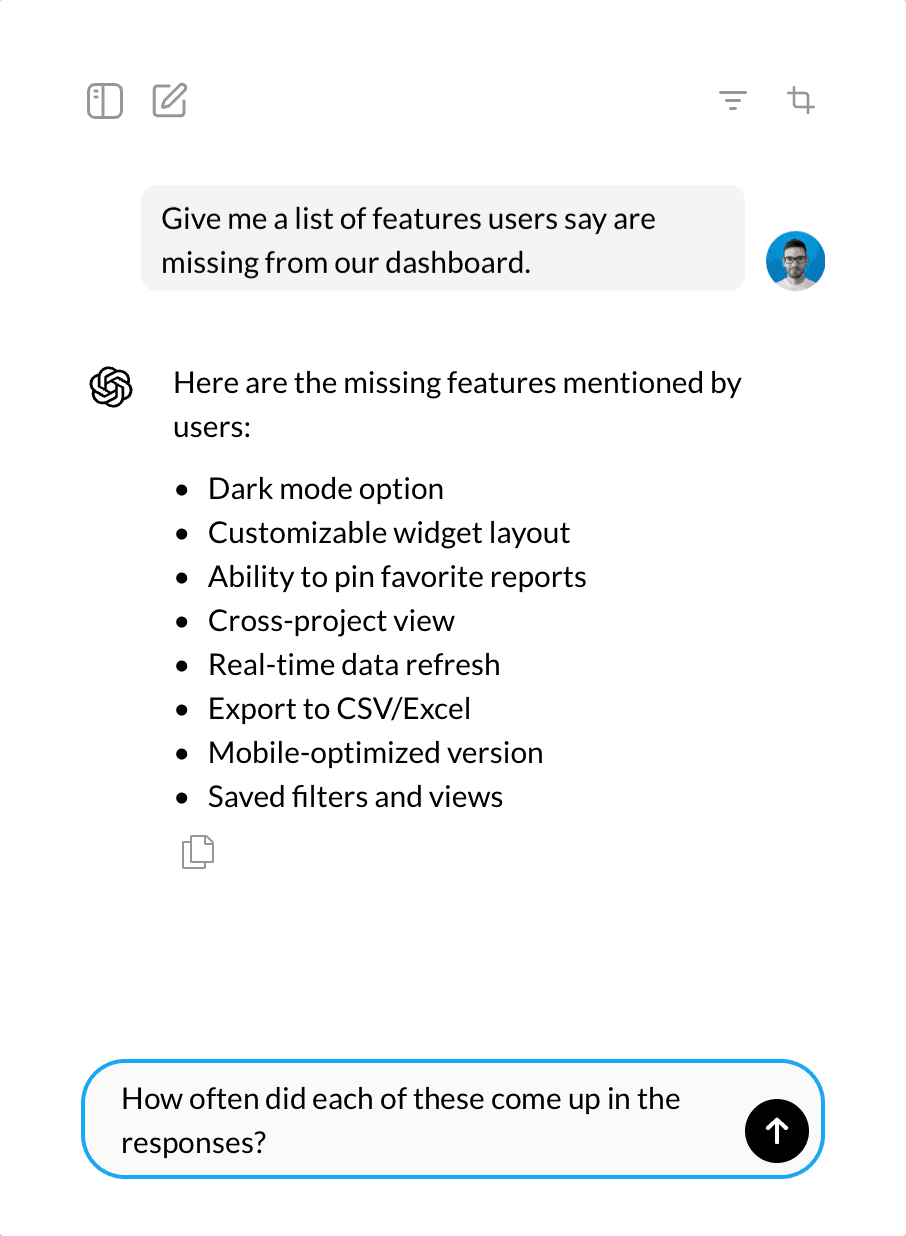
Survey and ChatGPT walk into a bar…
And the future of feedback walks out.
Highlights
What this unlocks
Chat with results
Ask follow‑ups like in ChatGPT, but grounded in your survey data — filtered, attributed, and current.
Targeted filters
Slice the chat context by choices, segments, or attributes to keep answers laser‑relevant.
Multiple analysis chats
Spin up parallel threads for different angles — retention, UX debt, pricing — each with its own filters.
Continue after the end
Optionally let respondents keep chatting after the survey ends to capture unexpected gems.
SDK + API ready
Install a single tag, identify users, track events, and stream responses to your workflows.
Stats where you need them
Lightweight counts above each summary: displays, reach, responses, and non‑responses.
How it works
Create. Collect. Converse.
Launch an AI survey anywhere—inside your product or on a shareable link. Then talk to the results like you would to an analyst.
Create the survey
Chat to generate questions or start from an expert template. Set tone, languages, and follow‑up depth. Learn more about our survey builder.
Collect responses
Run it in‑product or share a landing page link. The AI interviewer asks smart follow‑ups in real time. Learn more
Converse with insights
Ask anything about results, filter to segments, and paste summaries where you need them.
Not just for product teams. If you run a survey, this helps.
Product & UX
- PMF validation
- NPS with probing
- Churn & upgrade reasons
HR & People Ops
- Pulse polls
- Onboarding feedback
- Exit interviews
Events & Communities
- Attendee feedback
- Sponsor ROI
- Speaker scoring
CX & Support
- Post‑ticket CSAT
- Feature requests
- Knowledge gaps
Education & Parents
- Kindergarden parent surveys
- Course retros
- Campus services
Public & Research
- Opinion polling
- Civic inputs
- Market research
Build surveys in seconds
Frequently Asked Questions
What is AI Survey Response Analysis?
It's a feature in Specific that lets you interact with your survey results conversationally—just like chatting with ChatGPT, but with full context of your responses. You can ask questions, filter by segments, and get summaries without exporting data.
What kinds of questions can I ask the AI?
Anything that helps you understand your results—such as "What are the top complaints from event attendees?", "Why are parents happy with our kindergarten?", or "How do Pro plan users in Europe describe our product?".
How is this different from regular survey tools?
Traditional tools give you charts and tables. With Specific, you can have a natural conversation with your data, get per-question summaries, and uncover the "why" behind answers instantly.
Does it work for non-English surveys?
Yes. You can run surveys in multiple languages at once. The AI will still summarize and let you chat about responses across languages.
Does it handle multilingual responses?
Yes. The AI can summarize and converse about responses in multiple languages at once, making it ideal for global surveys.
How do summaries work?
For every question, the AI distills responses into concise bullet points, highlighting key themes and representative quotes. You can also view sentiment and frequency hints.
Does the AI work across all survey types?
Yes. Whether it's product feedback, conference surveys, NPS, parent satisfaction, employee polls, or public opinion, the AI adapts its analysis to your context.
What is Specific?
Specific is an AI-powered survey platform that creates conversational surveys—chat-like interviews that adapt in real time and summarize responses using GPT-based AI.
How are conversational AI surveys different from traditional surveys?
Traditional surveys collect static responses. AI surveys follow up in real time, clarify vague answers, and explore deeper motivations—without requiring live interviews.
Does it integrate with my tools?
Yes. Specific connects via a JavaScript SDK or public API, supports code/no-code triggers, and exports results into your existing workflows.