From First Answer to the Truth Behind It
Let the AI interview your users like a sharp product researcher with automated follow-up questions. It probes, clarifies, and goes deeper—automatically.
Try live survey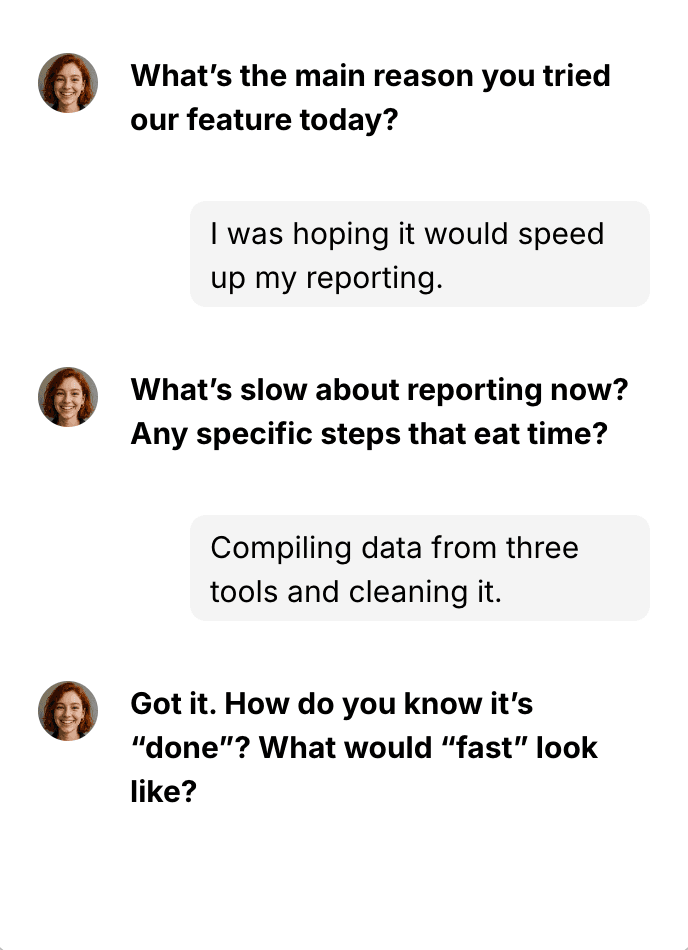
Survey and ChatGPT walk into a bar…
And the future of feedback walks out.
Why it matters
Deeper insight without interview overhead
Stop losing context to one‑line answers. The AI follows up like a human—asking "why?", clarifying ambiguity, and exploring edge cases—then summarizes everything for your team.
Probe motivation
Ask why to uncover root causes behind behavior and sentiment.
Segment‑aware
Adapt follow-ups for different audiences or situations. Give the AI instructions on how to respond based on who's answering and what they say.
Clarify ambiguity
Disambiguate fuzzy phrases like 'too slow' or 'confusing' into concrete steps.
Your guardrails
Define tone, depth, and red lines (e.g., never talk about discounts).
How it works
Structured + Generative
You control the survey's structure—question types, tone, and follow-up rules—while the AI fills in the conversational gaps in real time.
Generate survey
Start from scratch, a template, or simply describe your goals in plain language—the AI instantly builds a fully structured, conversational survey for you.
Explore our AI Survey Editor →Fine-tune follow-ups (optional)
Every follow-up is already set by the AI in step one, but you can refine them to your exact needs—adjusting tone, depth, or even specifying what to ask in certain scenarios.
Share survey or target in‑product
Share as a standalone landing-page link or trigger it inside your product/website via code or no-code events.
Runtime interviewing
The AI adapts follow-ups in real time—probing deeper, clarifying ambiguity, and matching your chosen tone and language automatically.
Analyze responses
Every answer is summarized, themes are distilled, and you can chat directly with GPT about your results—turning raw feedback into actionable insights instantly.
Learn more about AI Survey Response Analysis →Create surveys in seconds
Frequently Asked Questions
Can I stop the AI from asking about certain topics?
Yes. You can add guardrails (e.g., "don't ask about discounts"), set maximum follow-up depth, and control tone to ensure the AI only asks what's relevant.
Does it work in multiple languages?
Yes. Enable auto-localization so respondents see the survey in their preferred language, and the AI adapts follow-ups automatically. You can try it out here.
Is it suitable for multilingual audiences?
Absolutely. With multilingual mode, respondents answer in their own language without manual translations.
Can I customize follow-up questions?
Yes. The AI generates follow-ups when your survey is created, but you can fine-tune them—adjusting tone, depth, and triggers for different audience types or answers.
How do I analyze all those conversations?
Specific summarizes each response, identifies recurring themes, and lets your team chat with GPT about results—turning raw feedback into actionable insights. Learn more.
How is a survey delivered?
You can run surveys inside your product via the in-product widget with targeting, or share them through a standalone landing page link for public or internal polls.
How are conversational AI surveys different from traditional surveys?
Traditional surveys collect static responses. AI surveys follow up in real time, clarify vague answers, and explore deeper motivations—without requiring live interviews.
What types of surveys can I create?
Any. You can create in-product surveys and landing page surveys for use cases like feature validation, churn analysis, market research, NPS measurement, employee feedback, and more. Explore our AI Survey Editor.
Does it integrate with my tools?
Yes. Specific connects via a JavaScript SDK or public API, supports code/no-code triggers, and exports results into your existing workflows.
What is Specific?
Specific is an AI-powered survey platform that creates conversational surveys—chat-like interviews that adapt in real time and summarize responses using GPT-based AI.